When I first started exploring digital storage seriously, I kept hearing the term En terabyte everywhere. Hard drives advertised one terabyte of space. Cloud services promised terabytes of backup. Tech reviewers compared devices based on how many terabytes they could hold. At some point, I realized that many people use the word without fully understanding what it represents. So in this guide, I want to clearly explain what a terabyte is, how it compares to other storage units, where we use it today, and why it matters more than ever in a data driven world.
What Is a En Terabyte
A terabyte, often abbreviated as TB, is a unit of digital information storage. It is part of a system of measurement used to quantify data size in computers and digital devices.
In the decimal system that manufacturers commonly use:
1 terabyte equals 1,000 gigabytes
1 terabyte equals 1,000,000 megabytes
1 terabyte equals 1,000,000,000 kilobytes
1 terabyte equals 1,000,000,000,000 bytes
However, in computing systems that use binary measurement:
1 terabyte equals 1,024 gigabytes
1 terabyte equals 1,099,511,627,776 bytes
This difference between decimal and binary measurement often explains why a 1 TB hard drive shows slightly less usable space when connected to a computer.
The Meaning Behind the Word En Terabyte
The word terabyte comes from two parts:
Tera, which means trillion in the metric system
Byte, which is the basic unit of digital data
The prefix tera is part of the International System of Units and represents 10 to the power of 12 in decimal terms. When combined with byte, it represents an enormous quantity of digital information.
Understanding the origin of the term helps clarify that a terabyte is not just a marketing number. It represents a trillion bytes of data capacity.
From Bytes to Terabytes: The Storage Hierarchy
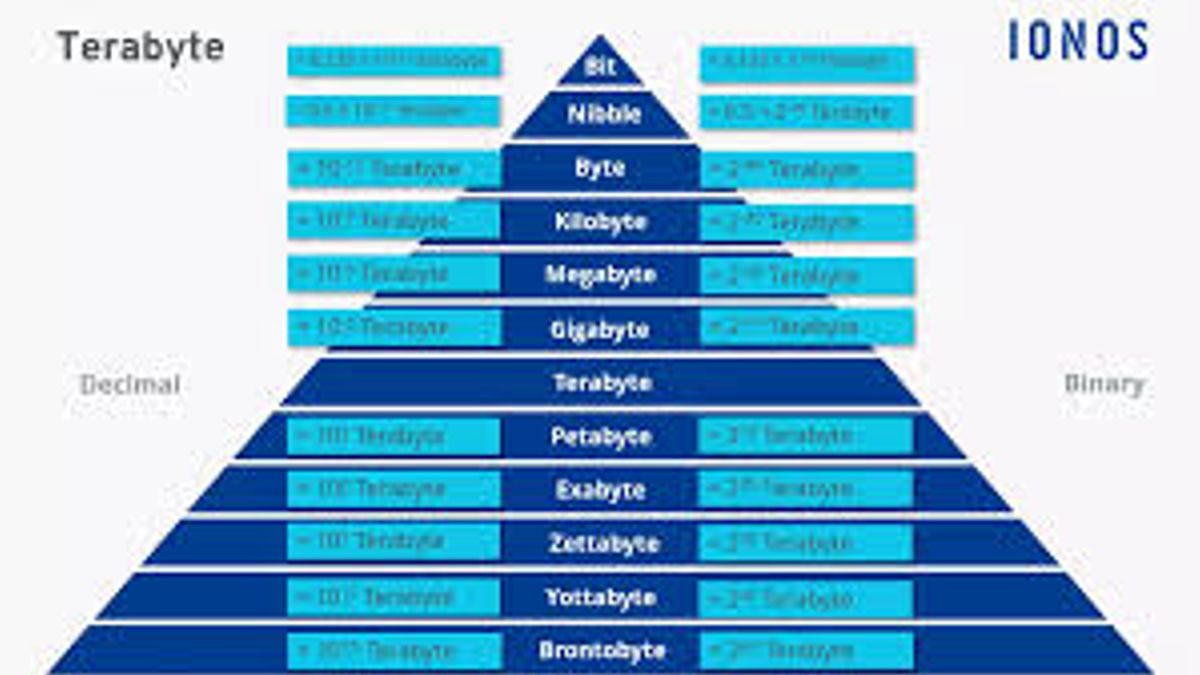
To understand a terabyte fully, I think it helps to step back and look at the entire hierarchy of data measurement.
Byte
A byte consists of 8 bits. It typically represents one character, such as a letter or number.
Kilobyte
1 kilobyte equals approximately 1,000 bytes. A small text file might be just a few kilobytes in size.
Megabyte
1 megabyte equals about 1,000 kilobytes. A high resolution photo may take up several megabytes.
Gigabyte
1 gigabyte equals about 1,000 megabytes. Movies, games, and large applications are measured in gigabytes.
Terabyte
1 terabyte equals about 1,000 gigabytes. Entire operating systems, massive game libraries, professional video archives, and enterprise databases are measured in terabytes.
This progression shows how rapidly digital storage scales. What once required an entire server room now fits into a portable external drive.
How Much Data Can 1 Terabyte Hold
One of the most common questions I hear is simple: what can I actually store in a en terabyte?
Here are some approximate examples:
- Around 250,000 high quality photos
- About 250 full length HD movies
- Roughly 500 hours of HD video
- Over 6.5 million document pages
- Thousands of hours of music
Of course, exact numbers vary depending on file size and compression, but this gives a realistic picture of the scale.
For an average home user, 1 TB is often more than enough for personal storage. For businesses, it may represent just a small portion of their data needs.
The Rise of En Terabyte Storage in Consumer Devices
In the early days of personal computing, storage was measured in megabytes. Then gigabytes became the standard. Today, terabyte storage is common in many devices.
External Hard Drives
Portable hard drives frequently offer 1 TB, 2 TB, or even 5 TB options for backup and storage.
Solid State Drives
Solid state drives, or SSDs, have become faster and more reliable than traditional hard drives. Many laptops now ship with 1 TB SSDs as a standard configuration.
Gaming Consoles
Modern consoles such as the PlayStation 5 and Xbox Series X use high capacity internal storage, often around 1 TB, because modern games can exceed 100 GB each.
Smartphones
High end smartphones now offer 1 TB storage variants. For content creators and heavy users, terabyte storage in a phone once seemed impossible, but it is now reality.
Terabytes in Cloud Storage
Cloud computing changed how we think about storage. Instead of storing everything locally, many people now rely on cloud platforms.
Services such as Google Drive, Dropbox, and Microsoft OneDrive offer terabyte level plans for individuals and businesses.
Cloud terabyte storage allows:
- Remote access from any device
- Automatic backup
- Collaboration across teams
- Disaster recovery
For small businesses, purchasing 1 TB of cloud storage may be more efficient than managing physical drives.
Terabytes in Business and Enterprise Systems
While a terabyte may seem huge for personal use, it is relatively small in enterprise environments.
Businesses generate data from:
- Customer transactions
- Email communications
- Website analytics
- Video surveillance
- Machine logs
- Financial systems
Large companies may store hundreds of terabytes or even petabytes of information. Data centers operated by organizations such as Amazon Web Services handle enormous amounts of storage for clients worldwide.
In this context, en terabytes become building blocks of much larger storage architectures.
Video, Streaming, and the Terabyte Era
Video content has significantly increased storage demands. High resolution formats such as 4K and 8K consume massive space.
For example:
- One hour of 4K video can take up 7 to 15 GB
- Professional raw 4K footage can exceed 100 GB per hour
Content creators, filmmakers, and YouTubers regularly manage multiple terabytes of footage.
Streaming platforms like Netflix store vast amounts of content across global data centers. Even a single series in multiple resolutions and languages can consume terabytes of storage.
Gaming and the En Terabyte Challenge
Modern games have grown dramatically in size. Open world titles with detailed graphics, expansive maps, and downloadable content can exceed 150 GB.
A 1 TB drive might hold:
- 6 to 10 large AAA games
- Several smaller indie titles
- System files and updates
Gamers often upgrade to 2 TB or larger drives to avoid constantly deleting and reinstalling games.
Data Backup and the Importance of Terabytes
Backup strategies are more important than ever. Whether I am protecting personal memories or business data, storage capacity matters.
A 1 TB external drive can:
- Backup an entire laptop
- Store years of photos and videos
- Preserve business documents
- Create system images for recovery
Terabyte level backup is now affordable, making data protection accessible to everyday users.
Terabyte vs Tebibyte: Understanding the Difference
There is often confusion between terabyte and tebibyte.
A terabyte equals 1,000 gigabytes in decimal.
A tebibyte equals 1,024 gibibytes in binary.
Operating systems sometimes display storage using binary measurement, which is why a 1 TB drive may show about 931 GB available.
Understanding this distinction prevents confusion and unrealistic expectations about usable space.
The Future Beyond Terabytes
While terabytes feel massive, technology keeps advancing.
After en terabyte comes:
- Petabyte
- Exabyte
- Zettabyte
- Yottabyte
Global data production already reaches zettabyte levels annually. As artificial intelligence, cloud computing, and IoT expand, storage requirements will continue to grow.
Organizations such as International Data Corporation track global data growth and consistently report exponential increases in digital information.
Why Terabytes Matter in the AI Era
Artificial intelligence systems require enormous datasets for training and deployment.
Large language models, image recognition systems, and autonomous systems often rely on terabytes of training data. Companies developing advanced AI platforms manage storage at massive scale.
Without affordable terabyte storage, modern AI innovation would not be possible.
Practical Advice: How Much Storage Do You Need
When choosing storage, I consider:
- File types I create
- Backup requirements
- Future growth
- Budget
For casual users:
- 512 GB may be enough
- 1 TB offers comfortable space
For content creators:
- 2 TB or more is safer
For businesses:
- Scalable cloud terabyte solutions are often best
Choosing slightly more storage than you currently need can prevent frustration later.
Internal vs External Terabyte Storage
Internal storage sits inside your device. It offers speed and direct access.
External storage connects through USB or other interfaces. It provides portability and backup capability.
SSDs offer faster performance but cost more per terabyte. Traditional hard drives provide more storage at lower cost but slower speeds.
Balancing performance and capacity is essential when selecting en terabyte storage solutions.
Security Considerations with Terabyte Storage
More storage means more responsibility. Sensitive data requires:
- Encryption
- Strong passwords
- Two factor authentication
- Secure backups
Cloud platforms often provide encryption by default. Physical drives should also be encrypted to prevent data breaches if lost or stolen.
Environmental Impact of Data Storage
Data centers consume significant electricity. As terabyte usage increases globally, energy demand rises.
Major technology companies invest in renewable energy to power storage infrastructure. Sustainable storage solutions are becoming a priority.
Reducing unnecessary data, deleting duplicates, and managing backups efficiently can also help reduce digital waste.
The Economics of Terabyte Storage
The cost per terabyte has dropped dramatically over the past two decades. What once cost thousands of dollars is now affordable for home users.
Competition among manufacturers and advances in semiconductor technology continue to drive prices down.
Affordable terabyte storage has democratized digital creation, enabling independent filmmakers, entrepreneurs, and students to store and manage large projects.
conclusion
When I look at the term terabyte now, I see more than just a technical measurement. I see a symbol of how far digital technology has evolved. From floppy disks measured in kilobytes to portable drives holding multiple terabytes, the transformation has been extraordinary.
Understanding what a terabyte represents helps make smarter decisions about devices, backups, cloud services, and digital workflows. Whether you are a student, gamer, business owner, or content creator, terabyte storage plays a central role in modern life.
Frequently Asked Questions
1. What is a terabyte in simple words?
A terabyte, or TB, is a unit used to measure digital storage. It equals about 1,000 gigabytes. I usually explain it as a very large amount of space used to store files like photos, videos, software, and documents.
2. How many gigabytes are in one terabyte?
In decimal measurement, 1 terabyte equals 1,000 gigabytes.
In binary measurement used by some operating systems, 1 terabyte equals 1,024 gigabytes.
This is why a 1 TB drive may show slightly less available space when connected to a computer.
3. How much data can 1 terabyte hold?
A 1 TB storage device can hold approximately:
- 200 to 300 HD movies
- Around 250,000 high quality photos
- Hundreds of thousands of documents
- Thousands of hours of music
The exact number depends on file size and format.
4. Is 1 terabyte enough for personal use?
For most home users, yes. A 1 TB drive is usually enough for documents, photos, videos, and software. However, gamers, video editors, or content creators may need 2 TB or more.
5. Why does my 1 TB drive show only about 931 GB?
Manufacturers calculate storage using decimal units, while operating systems often calculate using binary units. Because of this difference, usable space appears lower than advertised.